

Buyer Guides · Audio
Bring clearer dialogue and bigger sound to movie night
Start with a Sonos Arc Ultra soundbar, add bass, or build a surround system. Here’s what the four options change—and which one we’d choose for your room.
The picture looks great, but dialogue gets buried and the big scenes sound small. A Sonos setup starts with the Arc Ultra under your TV. From there, a subwoofer adds bass, and a pair of rear speakers brings sound around your seating area.
The choice is how much equipment you want in the room and what you want it to do. All four configurations here use the same Arc Ultra soundbar. The bundles add different speakers around it.
This comparison covers Soundbar, Premium Entertainment Set, Premium Immersive Set, and Ultimate Immersive Set in the linked Amazon listing. Each offers black or white color options. All purchase buttons open that same listing; select your preferred configuration and color there before checkout.
Swipe across the table to see the full comparison.
| Option | Included equipment | Why we’d choose it |
|---|---|---|
| Soundbar | Arc Ultra | A straightforward TV upgrade with one speaker at the front of the room. |
| Premium Entertainment Set | Arc Ultra + Sub 4 | More bass without placing speakers behind the sofa. |
| Premium Immersive Set | Arc Ultra + Sub 4 + two Era 100 speakers | Bass and dedicated rear surround speakers for a living-room setup. |
| Ultimate Immersive Set | Arc Ultra + Sub 4 + two Era 300 speakers | Rear surround with upward-firing drivers for Dolby Atmos height effects. |
See what goes where
Same TV. Same sofa. Four ways to build the sound around them. These overhead layouts show what each bundle adds to the room.
Soundbar
Arc Ultra
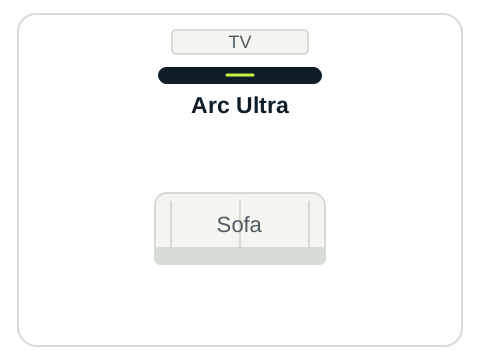
One speaker at the front of the room. The simplest setup here.
Premium Entertainment Set
Arc Ultra + Sub 4
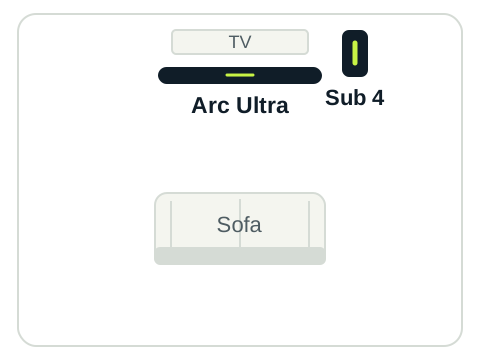
A separate subwoofer adds bass without putting speakers behind the sofa.
Premium Immersive Set
Arc Ultra + Sub 4 + two Era 100 speakers
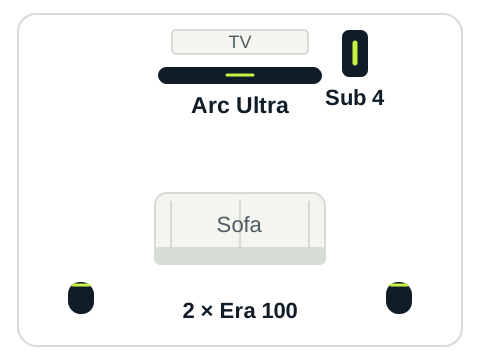
The rear pair adds dedicated surround channels around your seating area.
Ultimate Immersive Set
Arc Ultra + Sub 4 + two Era 300 speakers
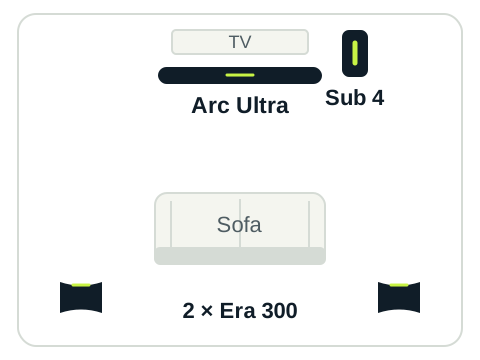
Era 300 replaces the Era 100 pair, adding upward-firing drivers for compatible Atmos height effects.
Illustrative layouts, not to scale. Sub 4 is shown in one possible position; it can go elsewhere in the room with its opening unobstructed. Black symbols identify the equipment; each bundle also comes in white.
Place surrounds behind and to either side of your seat. Face Era 300’s front grilles toward the TV, and leave space beside and above them. Every component needs power, so plan outlets as well as speaker positions.
Paid link
Soundbar: keep the setup simple
Choose Arc Ultra on its own if you want to improve TV sound without finding space for several speakers. It supports Dolby Atmos and has adjustable Speech Enhancement for dialogue. Both features are included with Arc Ultra on its own.
We’d start here for an apartment, a shared living space, or a room where rear speakers would be awkward. You can add a compatible Sub and surrounds later. Start with the soundbar, then decide whether you want more bass or rear speakers.
All the sound comes from the TV area. Add rear speakers if you want surround effects from behind your seat.
Paid link
Premium Entertainment Set: add the bass
This pairs Arc Ultra with Sub 4, a dedicated subwoofer for low frequencies. It’s the option we’d consider when you want more weight in movie effects and music but don’t want to arrange rear speakers around the room.
It suits an open living area where a subwoofer has a sensible home but the sofa backs onto a walkway. You get the same soundbar features as the standalone option, with a separate speaker handling bass.
If you mostly watch dialogue-led programs at modest volume, try the soundbar first. Consider shared walls and how much bass you can comfortably use.
Premium Immersive Set: bring sound behind you
This set adds two Era 100 speakers to Arc Ultra and Sub 4. Set up as surrounds, they play the rear channels of the soundtrack.
For a living room with usable space on both sides of the seating area, this is where we’d start for a complete surround setup. The subwoofer handles bass, while the rear pair can place surround effects around you when the soundtrack provides them.
Era 100 does not have the upward-firing drivers found in Era 300. Arc Ultra still supports Dolby Atmos; the distinction is what the rear speakers add. Choose Premium Immersive if dedicated rear sound is the goal and you don’t need the Era 300’s height capability.
Ultimate Immersive Set: choose it for Atmos movie nights
The Ultimate set keeps Arc Ultra and Sub 4 but replaces the Era 100 pair with two Era 300 speakers. Their upward-firing drivers add height capability at the rear, using reflected sound from the ceiling with compatible Dolby Atmos content.
We’d choose this for someone who watches Atmos films regularly and can give the rear speakers suitable placement. Arc Ultra and Sub 4 stay the same in both surround bundles.
Leave room around the Era 300 speakers for sound to project. Tucking them into enclosed shelves works against their design. Ceiling shape, speaker placement, and the soundtrack all affect the height effects you hear.
Check the room and TV before ordering
- Check the TV’s audio connection. Dolby Atmos requires HDMI ARC or eARC, compatible content, and a TV/source combination that passes the format through. Lossless Dolby TrueHD Atmos requires eARC. You can check the received audio format in the Sonos app.
- Plan power and placement. Each speaker needs a power outlet. Allow space for the soundbar, subwoofer, and rear pair you choose, including any stands or mounts.
- Set up the system in the Sonos app. Configure the rear speakers as surrounds for the TV room. Grouping separate rooms together is different from setting up surround channels. Use the available Trueplay tuning to adjust the system for the room.
- Choose the configuration and color together. Amazon offers black and white options for each setup. Check the selected bundle’s component list and color before checkout; our shared link may open with a different option selected.
Our take: choose the speakers you have a place for
Soundbar is the starting point for a simpler room. Premium Entertainment adds bass when rear speakers don’t fit. Premium Immersive is our starting recommendation for a living-room surround system. Ultimate Immersive makes sense when Atmos movies and suitable Era 300 placement are part of the plan.
Decide where the equipment will go before choosing the bundle. A setup that fits your room is easier to enjoy every day.
Based on Sonos documentation and our editorial assessment, not a hands-on test. Information checked November 7, 2026. Bundle names can appear with other Sonos soundbars, so confirm Arc Ultra, Sub 4, and the intended rear-speaker model in the option you select.
Sources
Sonos bundle descriptions, product guides, and support documentation informed this comparison.