

Buyer Guides · Connected home
Give movie night a bigger, richer picture
The LG OLED evo C6 combines 4K detail with OLED’s deep blacks and precise contrast. Choose the screen size for where you sit, from a close-up 42-inch setup to an 83-inch living-room centerpiece.
A bigger TV makes the picture larger. OLED changes the picture itself: a dark sky can stay dark around a bright moon, and a small highlight can stand out without lighting up a whole patch of the screen.
That’s the appeal of the LG OLED evo C6. The next decision is size. Our Amazon link includes 42-, 48-, 55-, 65-, 77-, and 83-inch options, so start with your seating distance before picking one.
Paid link
What OLED brings to the picture
Deep blacks, with light exactly where it belongs
Each OLED pixel produces its own light and can switch off individually. An LCD TV, including one marketed as LED or Mini LED, uses a backlight behind the picture. OLED doesn’t need that separate light source.
In practice, that gives bright and dark parts of a scene a crisp separation. Stars, subtitles, and city lights can sit against black without the backlight halos that can appear around them on an LCD. This is especially appealing for evening films, when the room is dark enough to appreciate the contrast.
A picture that works across the sofa
OLED’s wide viewing angles are useful when everyone can’t sit directly in front of the screen. The person at the end of a sectional can still enjoy the picture without the same degree of off-center color and contrast loss associated with many LCD panels.
Quick pixel response for movement
OLED pixels change quickly, helping reduce the trails behind moving objects. That is useful for games and fast action. A movie’s frame rate and the TV’s motion settings also affect how movement looks.
The C6 supports Dolby Vision and FILMMAKER MODE, giving you options for HDR movies and a presentation intended to preserve the filmmaker’s look. Its webOS smart platform provides streaming access; an internet connection, an LG account for network-based smart services, and any required streaming subscriptions are separate considerations.
Measure from your seat, not across the whole room
Sit where you normally watch, then measure from your eyes to the planned screen position. Use the distance between your seat and the screen, allowing for the sofa’s position and the depth of the TV stand.
Use the table as two starting points. The movie view fills more of your vision. The everyday view leaves more of the room around the picture. Neither is a minimum safe distance or a rule you have to follow.
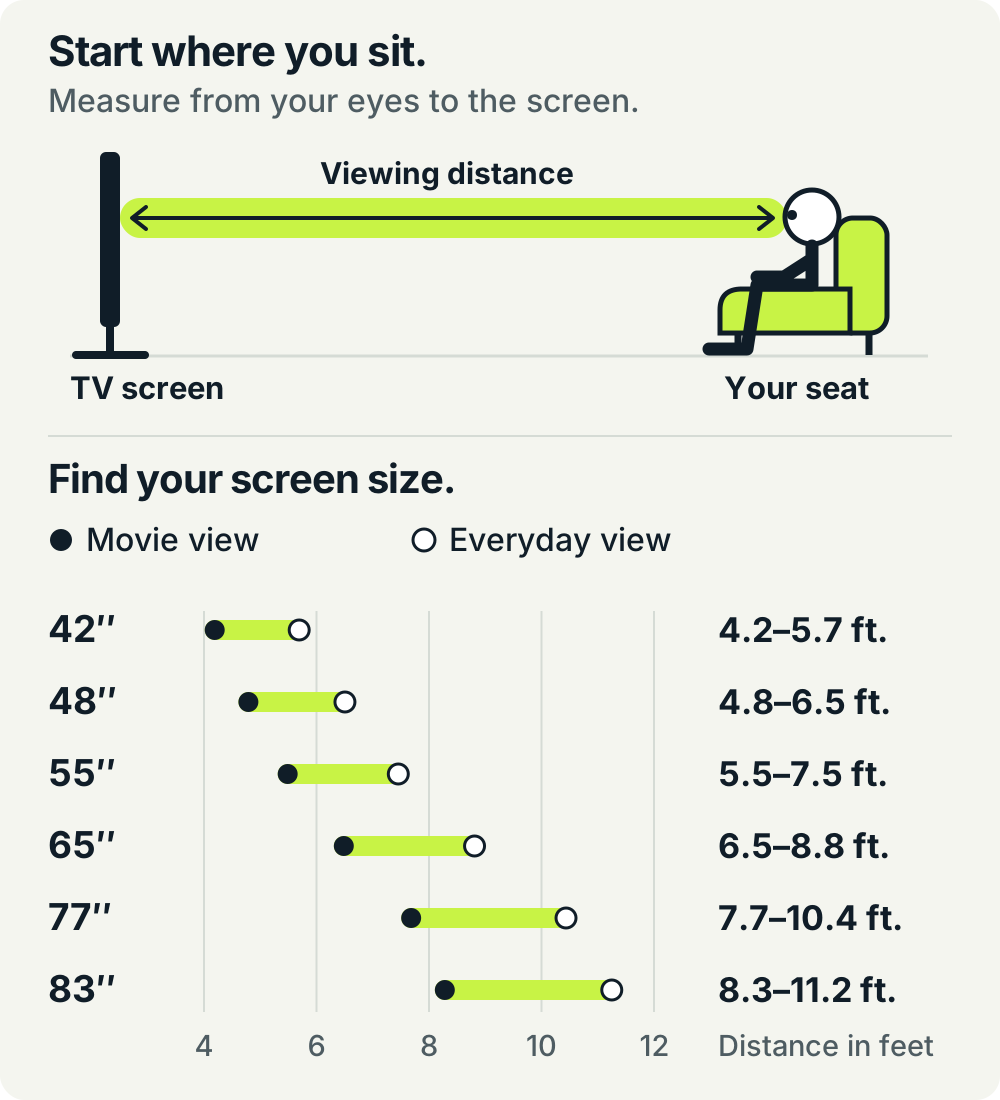
Swipe across the table to compare distances and screen widths.
| Screen size | Movie view About 40° | Everyday view About 30° | Approx. screen width |
|---|---|---|---|
| 42 inches | 4.2 ft. | 5.7 ft. | 36.6 in. |
| 48 inches | 4.8 ft. | 6.5 ft. | 41.8 in. |
| 55 inches | 5.5 ft. | 7.5 ft. | 47.9 in. |
| 65 inches | 6.5 ft. | 8.8 ft. | 56.7 in. |
| 77 inches | 7.7 ft. | 10.4 ft. | 67.1 in. |
| 83 inches | 8.3 ft. | 11.2 ft. | 72.3 in. |
Distances and widths are our geometric calculations for nominal 16:9 screens, rounded to one decimal place. LG’s sizing guide uses roughly 40° as an immersive reference; we also show 30° for a less screen-filling view. Widths describe the screen area, not the TV cabinet or stand. Check the selected model’s actual dimensions for installation.
Paid link
Which size would we choose?
42 or 48 inches: a close seat or a compact room
These sizes suit a smaller bedroom, a snug, or a setup where you sit roughly four to six feet away. At five feet, a 42-inch screen gives you a little more breathing room, while a 48-inch screen feels more immersive.
If you watch from a bed eight feet away, consider a larger screen.
55 or 65 inches: a flexible living-room starting point
At six feet, we’d compare 55 and 65 inches: 55 for a more relaxed view, or 65 if you enjoy a picture that takes up more of your attention. Around eight feet, 65 inches is a useful everyday starting point.
This is also where measuring the furniture helps. A nominal 65-inch screen is about 57 inches wide before you account for the frame. Check the stand’s width and depth against your console’s dimensions.
77 or 83 inches: more of the movie from a farther seat
At about eight feet, 77 inches is close to our movie-view reference. An 83-inch screen fills a little more of your vision. Around ten feet, both remain reasonable options, with 83 inches giving the larger presentation.
If the sofa is twelve feet or more from the screen, even 83 inches will look less immersive than it does at eight feet. Moving the seating closer can make a bigger difference than the step from 77 to 83 inches.
The 83-inch screen has about 16% more picture area than the 77-inch screen, based on their nominal diagonals. That’s a noticeable increase in wall space, so tape out the outline before deciding.
Make the room work for the TV
Check daylight from your seat. OLED’s contrast is a strong reason to choose it, but a bright window reflected in the screen can still distract. Look at the planned position during the hours you actually watch. Curtains, shades, and a better screen position can help.
Check the exact size’s specifications. C6 family models don’t all carry identical panel and brightness features. For example, LG lists the US 77-inch C6H with Hyper Radiant Color Tech and Brightness Booster Pro, while its 65-inch C6 page lists Brightness Booster. Check the specifications for the size you plan to buy.
Give it varied content and follow OLED Care guidance. Prolonged static graphics can cause image retention or burn-in. Keep the TV’s protection features enabled and follow its care instructions, particularly if you plan to leave a news ticker, game HUD, or desktop on screen for long periods.
Leave room for the rest of the setup. Check the actual cabinet dimensions, stand or wall-mount requirements, and space for a soundbar. A larger picture shouldn’t force the screen into an uncomfortable position or block equipment you already use.
Our take: buy the picture you want at the distance you watch
Choose OLED for its precise contrast, deep blacks, and wide viewing angles. Then choose the size from your seat. At roughly six feet, start by comparing 55 and 65 inches. Around eight feet, compare 65 for everyday viewing with 77 for movie nights. Near ten feet, look closely at 77 and 83 inches.
Mark the outline on the wall, sit down, and picture a full evening with it. Check that the picture feels comfortable from your usual seat.
Paid link
Based on LG documentation, calculated screen geometry, and our editorial assessment, not a hands-on test. Information checked November 7, 2026. Confirm the selected size, model number, and installation dimensions before ordering.
Sources
Manufacturer documentation informed the OLED explanation, C6 features, viewing-distance reference, and care guidance.